“Reunderstanding the Internet from Attack” is a new series of articles. Instead of starting from scratch to explain how something works, I will directly begin with attack techniques, exploring how these attacks are executed and how to defend against them.
Reading the article with these questions in mind can help you consciously understand what you are learning and what problems the upcoming content aims to solve. Rather than a straightforward explanation of terms, “reading with questions from the beginning” is the approach I want to try.
This article will discuss the operational principles of DNS, attack techniques, and corresponding solutions. Without further ado, let’s get started.
Understanding DNS through DNS Cache Poisoning
I have heard of an attack technique called DNS cache poisoning, which can control DNS responses. For example, under normal circumstances, google.com should resolve to an IP like 142.250.21.139, but if an attacker poisons the DNS, it might respond with a different IP, causing users to connect to a different location.
One day, I suddenly became curious about how this is done and what defense methods exist.
Before knowing the answer, we must first understand how the entire DNS system operates.
DNS stands for Domain Name System. The most widely known explanation for the general public is that DNS is similar to a phone book; it translates google.com to 142.250.21.139 and github.com to 20.27.177.113. In the world of the internet, the lowest level address used to send packets is not the domain but the IP, so domains must be resolved to IPs.
A more relatable explanation is that a DNS server is like an experienced taxi driver. When you say you want to go to 101, they will accurately drive you to No. 7, Section 5, Xinyi Road, Xinyi District, Taipei City, converting these landmark names into addresses to take you to your destination.
So what exactly happens behind the scenes, and how does your computer query the DNS server?
When you connect to your home router, some routers will assign you an IP and tell you to use this IP for DNS. For example, the well-known 168.95.1.1 is the DNS server of Chunghwa Telecom. Whenever you want to look up the IP of a certain domain, you will ask it.
Since this server is responsible for resolving domains to IPs, it is usually referred to as a DNS resolver, and it operates as follows:
Although for us, it’s just a matter of asking it to get an answer, the operation behind it is more complex. Taking my domain blog.huli.tw as an example, it is actually a layered process. When we ask Chunghwa Telecom, they will query the service that manages all DNS: the “root name server,” which records who manages .tw and tells Chunghwa Telecom: “Go ask them.”
Then Chunghwa Telecom will ask the TLD name server that manages .tw. After checking huli.tw, this name server finds that the domain is managed by ken.ns.cloudflare.com and responds to go find them.
So Chunghwa Telecom will then ask ken.ns.cloudflare.com and receive the following results:
blog.huli.tw.   300 IN  A 104.21.51.169
blog.huli.tw.   300 IN  A 172.67.183.1
It has been confirmed that the IP corresponding to blog.huli.tw has these two, which will be returned to my browser, and then the browser will choose where to connect.
Since only ken.ns.cloudflare.com knows the final result in the entire chain, it is also called the authoritative name server.
The overall process is as follows:
The process of recursive resolution is quite long, so it is not possible to do this every time. In fact, every link has a cache, for example, the browser may have its own cache, the operating system does too, and the DNS resolver provided by Chunghwa Telecom also has it. Therefore, it does not need to check the entire chain every time to know the result; as long as it encounters a cache, it will return.
The DNS cache poisoning targets the DNS resolver, which is the Chunghwa Telecom 168.95.1.1 mentioned earlier. If I can poison google.com, then Chunghwa Telecom users visiting Google will connect to my server, demonstrating the significant impact of this attack.
The DNS resolver is responsible for converting domains into IPs. As long as we understand this, we can discuss two real events.
The CJSCOPE Incident
The laptop brand CJSCOPE originally launched a “One Like, One Dollar Off” event on its official website, but found that there were too many likes, so they temporarily changed the rules and closed the website early. Since some orders placed within the time frame were also canceled, netizens took them to court, and in the end, CJSCOPE lost the case.
I was quite concerned about this case at the time. Although many netizens felt that CJSCOPE was being unreasonable, I was curious about how the canceled orders would ultimately be judged. According to CJSCOPE, they had closed the website, but netizens were able to place orders through a “website vulnerability,” so those orders were invalid.
So what exactly is this website vulnerability? How was the website closed?
The closure actually means that CJSCOPE removed their DNS records. Once the cache expired, the official website naturally became inaccessible, and an error would be returned when you entered the URL. The so-called “website vulnerability” is that netizens modified their local /etc/hosts file, added the records back, and could connect to the official website without relying on the DNS resolver.
According to Taipei Shilin District Court Small Claims Civil Judgment No. 114 Year Shihsiao No. 5, the judge’s final opinion was:
Furthermore, if the defendant intended to refuse all orders, they should have taken the official website server offline. This is evident from the aforementioned netizen’s Facebook post, which shows that the defendant later adopted this measure. Therefore, the defendant did not take the official website server offline but merely disconnected the DNS and IP address, akin to a business temporarily removing its doorplate and sign (DNS) while still providing service (fulfilling orders) to any customer who knows the actual location (IP address). It cannot be said that the customer engaged in any fraudulent behavior or that the business was in error.
In other words, if you, as a business, do not want to sell things, you should take the server offline, but you only removed the DNS, and the website is still up. It’s like a business still operating but just taking down the sign; it’s reasonable for familiar customers to come in and buy things.
What I am concerned about is whether “removing the DNS record counts as closing the website,” and I thought of a hypothetical scenario: suppose one of a company’s test environments is exposed on the public internet (IT has also said it should be on the internal network, but some people think connecting via VPN is too troublesome and thought no one would look for it, so they put it on the public internet), but the URL is not public, and all the prices of items inside are half of the normal price.
If a passerby finds this URL and places an order through some means, would it be considered a valid transaction?
I don’t know if the passerby needs to prove they had sufficient reason to believe this website was legitimate to place the order, or if the company needs to prove that although the website is exposed on the public internet, it is not a public website. However, based on the CJSCOPE case, the latter may not work, as it would be considered public once the website is exposed.
The Blocking of Xiaohongshu and RPZ
As mentioned earlier, if I can make the DNS resolver resolve google.com to my IP, everyone will come to my server when connecting to Google, which counts as a malicious attack.
But there is also a method that operates on the same principle and follows the same approach, yet is considered benevolent.
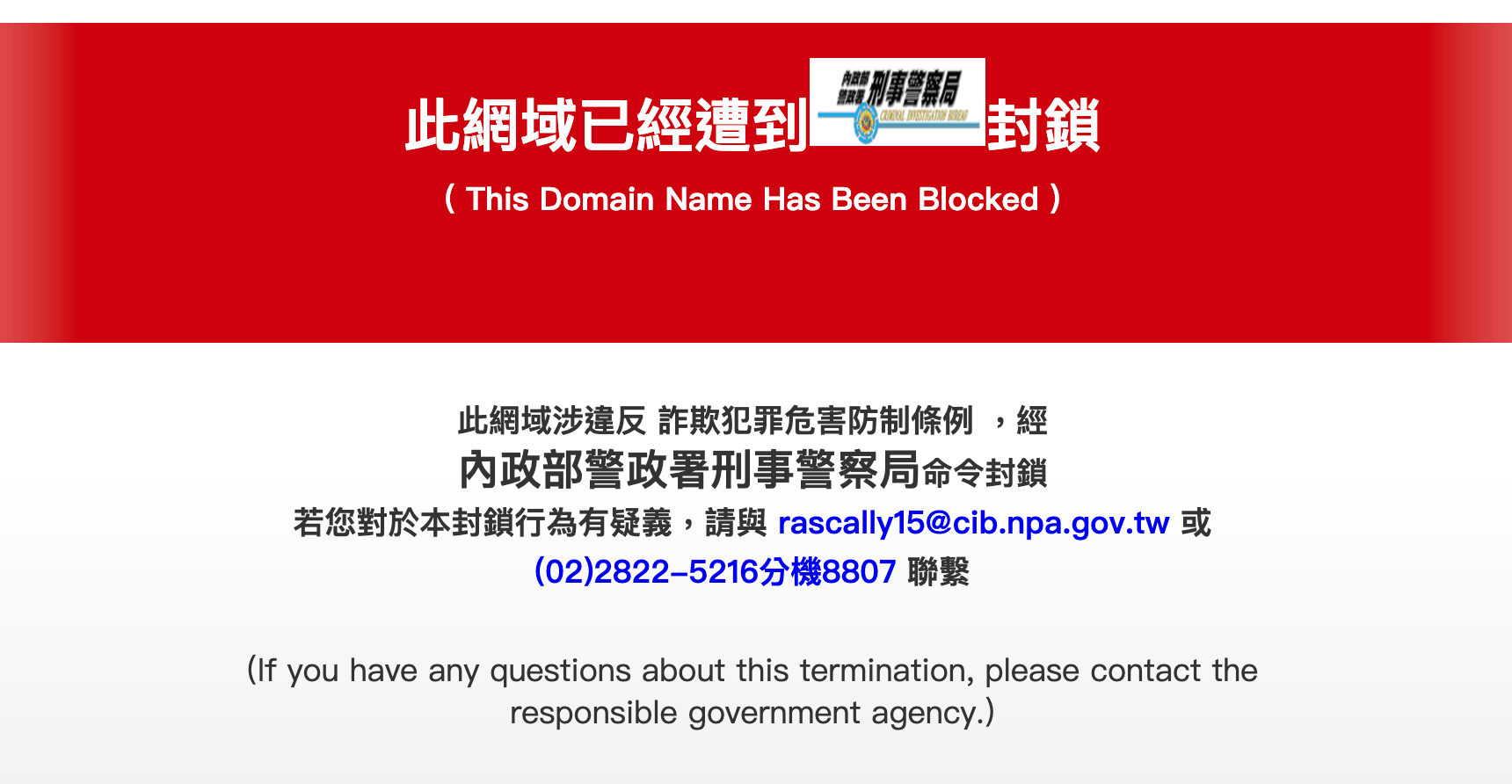
For example, the government discovers that a certain fraudulent website is rampant, so it directly instructs Chunghwa Telecom to resolve their domain to the IP of a government unit. As a result, when users connect to that website, they will see a warning screen and not the original content.
This mechanism is called DNS RPZ (Response Policy Zone). The Taiwan Network Information Center has created a special website to explain it: DNS RPZ Governance Mechanism. Various agencies submit requests for review, and once approved, major telecom companies in Taiwan will specifically change the IP resolution for this record, displaying a warning screen.
The most famous case is the blocking of Xiaohongshu at the end of last year. When you open the Xiaohongshu website in your browser, you will first see a certificate error page, and after clicking continue, you will see this:
After understanding how DNS works, you can see why the method circulating online to bypass it—“change DNS resolver”—can be successful.
Although the default DNS resolver used by many might be Chunghwa Telecom’s, this can be changed. You can switch to Google’s 8.8.8.8 or Cloudflare’s 1.1.1.1. Through these two DNS resolvers, you can still access Xiaohongshu.
If you’re curious, you can try it on your own computer. First, query Xiaohongshu’s IP through 168.95.1.1, and you will get 140.111.246.32 along with another RPZ-related explanation:
dig @168.95.1.1 www.xiaohongshu.com A

;; ANSWER SECTION:
www.xiaohongshu.com.  300 IN  A 140.111.246.32

;; ADDITIONAL SECTION:
rpztw.      60  IN  SOA localhost. This.is.an.infringing.website.rpztw. 1781775121 60 60 86400 60
And through 8.8.8.8, you will get the normal IP:
dig @8.8.8.8 www.xiaohongshu.com A

www.xiaohongshu.com.eo.dnse0.com. 60 IN A 43.170.214.10
www.xiaohongshu.com.eo.dnse0.com. 60 IN A 43.175.160.184
www.xiaohongshu.com.eo.dnse0.com. 60 IN A 43.175.164.195
www.xiaohongshu.com.eo.dnse0.com. 60 IN A 43.175.161.148
Therefore, DNS RPZ is still somewhat distant from a true blockade. Its original intention is to protect the public from connecting to illegal websites, but if you don’t want to be protected or if you know what you’re doing, you can still connect by simply changing the DNS; you won’t be blocked by the wall.
Such proactive interventions in the online world naturally lead to many discussions regarding regulations and systems. To what extent can the government intervene? How can we prevent arbitrary blocking by RPZ? Some believe that the government should not intervene at all, and that the online world should be free.
Indeed, Taiwan’s RPZ has inadvertently blocked many important services, such as Azure Web App and WordPress, which have suffered from this issue.
If you want to learn more about internet governance topics, you can refer to the OCF Foundation for Open Culture or the Taiwan Internet Governance Forum TWIGF. There have also been some public discussions on Facebook, such as this 2023 discussion on the RPZ mechanism and 2025 discussion on Xiaohongshu being blocked.
The Principle of DNS Cache Poisoning
Bringing the topic back to DNS cache poisoning, now that we understand how DNS operates, how exactly is this poisoning achieved?
As mentioned earlier, the DNS resolver queries ken.ns.cloudflare.com for the IP of blog.huli.tw. How does the attacker interfere with this result?
The first attack method that appeared historically was: “buy one get one free,” and the second was: “buzz in.”
First, the “querying the IP of blog.huli.tw“ involves sending a packet. The protocol used by DNS is UDP, so for the DNS resolver, it sends a packet to the name server responsible for resolving the IP of blog.huli.tw, assuming it is 108.162.193.127, with the content written as:
From: 168.95.1.1:53
To:   108.162.193.127:53

Question:
blog.huli.tw A?
Transaction ID: 12345
Under normal circumstances, the name server will respond after receiving it:
From: 108.162.193.127:53
To:   168.95.1.1:53

Transaction ID: 12345
Answer:
blog.huli.tw A 104.21.51.169
At this point, the resolver verifies that the transaction ID matches the source IP and trusts this result, storing it in its cache. The next time someone queries, it will respond directly.
The first technique, “buy one get one free,” involves the name server responsible for resolving blog.huli.tw secretly sending you results for other domains in the returned packet:
From: 108.162.193.127:53
To:   168.95.1.1:53

Transaction ID: 12345
Answer:
blog.huli.tw A 104.21.51.169
google.com A 104.21.51.169
It’s equivalent to saying, “Even though you didn’t ask, I’ll let you know that the IP for google.com is this.”
However, you need to have a legitimate name server responsible for resolving domain names to carry out this attack, which has a high prerequisite that most people cannot meet, but it did happen 30 years ago.
In 1997, Eugene Kashpureff’s AlterNIC was responsible for DNS resolution for some top-level domains, and he used this technique to influence the resolution results of another DNS service, www.internic.net.
This was not cybersecurity research but actual crime, so he was caught, and you can still find reports from The New York Times: From Jail and Boardroom, A Street Fight for the Internet and related press releases.
This issue was later fixed with the introduction of a mechanism called “bailiwick checking,” which checks whether the DNS server has the authority to answer the resolution records for that domain, preventing the “buy one get one free” tactic.
Next, let’s talk about the second technique, “fast answering.” Since the resolver trusts the result if the transaction ID matches the source IP, conversely, as long as the attacker can spoof these two things and do it faster than the original, the resolver will believe the forged result.
First, let’s discuss the spoofing of IP. The so-called IP is ultimately just a string of characters placed in the packet. Although the OS fills it in for you, you can modify it yourself and input the IP you want, thus successfully spoofing it.
However, in scenarios like HTTP that use TCP, there is a three-way handshake at the beginning. You send a packet to the other party, and then they send one back to you. In this second step, “the other party sends to you,” they will send it to your spoofed destination, and you won’t receive it, making it impossible to establish a connection. So, even if you spoof, it won’t work.
However, DNS uses UDP, so once the packet is sent out, it ends there, allowing for successful spoofing.
In addition, some ISPs perform filtering. When they detect that the IP in your packet is strange and not allocated to your network segment, they will drop the packet directly, so you can’t send it out at all. This mechanism is called BCP 38: Network Ingress Filtering.
But this is not mandatory, so once you find an ISP that does not implement BCP 38, you can spoof the source IP and send the forged response to the DNS resolver.
What about the transaction ID? This is a 16-bit ID, with only 65536 possible values, so you can just keep guessing. As long as you guess correctly, it’s yours. If you guess randomly each time, you have a 50% chance of hitting at least once after guessing 45426 times.
But this is only theoretical feasibility; there is a fatal flaw that has not been considered. As mentioned earlier, these name servers have caches. If I guess wrong this time, I have to wait for the cache to expire before I can guess again. Even if it’s just 1 minute, I would have to guess for 1 month to reach over 45000 guesses, which is somewhat impractical.
This flaw was overcome by Dan Kaminsky in 2008.
Black Ops 2008 – It’s The End Of The Cache As We Know It
This was the title of Dan Kaminsky’s talk at Black Hat USA 2008, and the slides can only be found in this version from Black Hat Japan.
The attack method he proposed is that since guessing wrong will be blocked, we can just guess a different subdomain.
First, guess 1.huli.tw, if wrong, then guess 2.huli.tw, and so on, continuously guessing further back. Since each guessed domain is different, even if the guess is wrong, there is no need to wait for the cache to expire. Originally, each guess would require a five-minute cooldown, but now there is no need to wait at all.
If you guess 100 times per second, you can complete over 45,000 guesses in 8 minutes, significantly increasing the success rate.
But what if you guess correctly? No one is going to visit a domain like 42.huli.tw, which doesn’t exist at all.
This is the key point. When we guess correctly, the forged response is not “42.huli.tw is at x.x.x.x,” but rather “I don’t know where 42.huli.tw is, you should ask x.x.x.x, huli.tw is managed by them.” Therefore, the DNS resolver gets polluted regarding the name server IP responsible for resolving huli.tw, and afterwards, it will ask the forged location.
This is somewhat similar to the previously mentioned buy one get one free, but there is a fundamental difference. Buy one get one free is: “You ask me for huli.tw, and I conveniently tell you google.com,” but that shouldn’t happen at all, so it was blocked.
Now it is: “You ask me for 42.huli.tw, and I tell you who manages huli.tw,” which is allowed because both belong to the same domain.
The entire attack process is as follows:
The final fix was that instead of just guessing a 16-bit transaction ID, now the port has also become random, and the range of the port is also 16 bits, so the possibilities have increased to 32 bits, from the original 60,000 to 4 billion.
By the way, Dan Kaminsky himself talked about some stories behind fixing the vulnerability at O’Reilly FOO Camp 2008, and the video is here: Geek Alert: Dan Kaminsky on the DNS Bug of 2008. The impact was so large that every company needed to cooperate in the fix.
Since the possibilities have become 4 billion, guessing correctly seems impossible. But hackers are good at digging deep; while 4 billion random numbers are impossible to guess, how are your random numbers generated?
DNS Cache Poisoning Like it’s 2006
USENIX Security is one of the most important cybersecurity academic conferences in the world. Although this year’s conference will be held in August, we can already see the accepted papers, and the title DNS Cache Poisoning Like it’s 2006 is one example, authored by Omer Ben-Simhon and Amit Klein from Hebrew University.
After the vulnerability discovered by Dan Kaminsky in 2008 was patched, the possibility of DNS cache poisoning attacks decreased significantly, as guessing a random number within 4 billion in a short time is quite difficult.
However, have you ever thought about how these random numbers are generated?
Typically, there are two ways to generate random numbers in programming: one is secure, and the other is not. The term “secure” here refers to “cryptographically strong,” meaning secure in a cryptographic sense.
In JavaScript, the insecure method is Math.random, while the secure method is crypto.getRandomValues. The difference lies in the underlying implementation; the former is predictable, while the latter is not.
Why can it be predicted? Because most random numbers are not truly random but are “pretending to be random.” For example, there is a simple algorithm for generating random numbers called LCG (Linear Congruential Generator), which can be written in JavaScript as:
class LCG {
  constructor(seed) {
    this.state = seed;
  }

  next() {
    const a = 1664525;
    const c = 1013904223;
    const m = 2 ** 32;

    this.state = (a * this.state + c) % m;
    return this.state;
  }
}

const rng = new LCG(123);

console.log(rng.next());
console.log(rng.next());
console.log(rng.next());
You pass in a seed as the initial state state, and then through a fixed formula: 1664525 * state + 1013904223, you take the modulus of m to get the result, which is the random number, and it will also become the next state. The function responsible for generating random numbers is called PRNG (Pseudo-Random Number Generator).
So as long as your seed is the same, the sequence of random numbers generated each time will be the same. Conversely, when you have enough random numbers, you can reverse-engineer what the original seed was. This is why it can be predicted; it’s just simple mathematics.
The software behind the DNS resolver is called BIND, and BIND uses a PRNG called Xoshiro128** when generating random numbers. After obtaining multiple outputs, you can trace back to its initial state. Once you have the initial state, you can predict what the next random number and every subsequent random number will be.
This is essentially solving a system of equations, similar to asking what x, y, and z are in 2x+y+z=3, 5x+2y+3z=2, x+y+z=9.
The key point is, how do you obtain these outputs? Besides the transaction ID and port, BIND also uses the same random number generator in other places. For example, when I query the record for google.com, the first response is:
google.com.   252 IN  A 142.250.21.102
google.com.   252 IN  A 142.250.21.138
google.com.   252 IN  A 142.250.21.139
google.com.   252 IN  A 142.250.21.113
google.com.   252 IN  A 142.250.21.101
google.com.   252 IN  A 142.250.21.100
And the second response is:
google.com.   247 IN  A 142.250.21.138
google.com.   247 IN  A 142.250.21.139
google.com.   247 IN  A 142.250.21.113
google.com.   247 IN  A 142.250.21.101
google.com.   247 IN  A 142.250.21.100
google.com.   247 IN  A 142.250.21.102
Each result is for the A type of google.com, which we call a Resource Record Set, abbreviated as RRSet. You can clearly see that although the IPs in the two responses are the same, the order is different.
This order is determined randomly, so when you have enough records in your RRSet (according to the original text, more than 23), you can deduce part of the seed from the sorted results. Doing this a few more times can restore all 128 bits of the seed, thus cracking the random number.
Once the random number is cracked, both the port and transaction ID can be guessed, reducing the 4 billion possibilities you were peeking into the future down to just 1, rendering the protective measures useless. The solution is to replace the random number with a more secure generation method and to keep important and unimportant random numbers separate.
In this example, important random numbers like transaction IDs and ports use the same PRNG instance as those unimportant random numbers like RRSet sorting, allowing you to reverse-engineer the seed from other places.
This vulnerability was fixed last October, and the official announcement can be found here: CVE-2025-40780: Cache poisoning due to weak PRNG.
By the way, I stumbled upon this unpublished research. I asked about the techniques for DNS cache poisoning, and it pointed me to this. If I had searched for it myself on Google, I might not have found it and would have ended up with other articles first.
However, since the article is very new, whether it’s ChatGPT or Gemini, as long as it doesn’t use search tools, the answers it gives you will be a bunch of hallucinations (but they seem very real and convincing), stating many things that are not written in the original text.
In the paper “DNS Cache Poisoning Like it’s 2006,” many details can be seen, one of which discusses DNS cookies. When I saw it, I thought, “Here comes another new term I’ve never heard of,” so I looked up what it was.
Although the proposal for DNS cookies existed in 2006, it wasn’t officially turned into RFC 7873 until 2016. Its main goal is to solve the problem of packet forgery.
All the previous writing revolves around the issue of packet forgery, and the solution proposed by DNS cookies is that when a DNS resolver wants to ask a DNS name server a question, it first brings along a 64-bit client cookie. This client cookie can be generated like this, using the client IP + server IP combined with a secret:
HMAC-SHA256-64(Client IP Address | Server IP Address, Client Secret)Next, the client cookie is sent along with the domain to be queried to the name server.
When the name server receives it, it generates a unique server cookie using a similar method (for example, hashing the client IP + client cookie + server secret), and sends the query answer along with the server cookie back to the client. The DNS resolver then stores the server cookie upon receipt.
From this point on, all query requests sent from the DNS resolver to that name server will carry the client cookie + server cookie. The name server will also check whether the client cookie and server cookie are correct when receiving requests.
Once this relationship is established, if the DNS resolver receives a forged response, the attacker cannot forge the server cookie since they do not know the client cookie, so the verification will fail.
Now, how does the method of guessing the random number discussed in the previous section bypass the defense of DNS cookies?
Although the DNS cookie mechanism is enabled by default in BIND, the expiration time for the new version is 60 seconds, meaning the entire process restarts every 60 seconds. Therefore, the attacker has an opportunity to attack every 60 seconds; as long as they can respond faster than the authoritative DNS, they can send their own client cookie first, thereby bypassing this protection mechanism.
Thus, while the entire DNS cookie mechanism seems sound, the expiration time is too short, so during the window immediately after expiration, it is effectively unprotected.
Furthermore, DNS cookies are not that widespread; among the top one million websites ranked by Alexa, only 32% support it.
In addition to DNS cookies, there is another protective measure called DNSSEC, and the paper mentions that they assume the victim has not enabled this mechanism, so there is no need to bypass it.
So what is DNSSEC?
The full name is DNS Security Extensions, and the problem it aims to solve is the same: how to prevent attackers from forging responses from authoritative DNS.
The methods mentioned earlier are essentially stopgap measures. Initially, the transaction ID could be guessed, so a random port was added to make it unguessable, then DNS cookies were introduced, and now there is an additional client cookie and server cookie that cannot be guessed, based on the first connection.
However, none of these methods can guarantee that the response received by the DNS resolver is from the authoritative DNS; they merely increase the difficulty through randomness. What can truly guarantee this should be similar to HTTPS, establishing a trust chain that can be verified through digital signatures.
And that is exactly what DNSSEC does. In simple terms, it can be thought of as the response from authoritative DNS containing a signature, which the DNS resolver can verify using cryptographic methods to check if this signature was issued by huli.tw. If it is, then it is accepted, preventing others from forging it.
However, this seemingly useful mechanism has a very low actual usage rate. According to the numbers provided by M11: DNSSEC Deployment in TLD and SLD, only 7% of the top 100 websites in the world have it set up, and only 12% for .tw.
DNSSEC needs to be configured by the domain owner, so it is up to each domain owner to handle it. If configured incorrectly, users may have trouble accessing the website. After some investigation, the reasons for the lack of adoption seem to be that deployment is relatively cumbersome and there are no incentives. Compared to the cost of implementation, the benefits seem lower.
However, some domain hosting services now handle these hassles for you, such as TWNIC, which has DNSSEC enabled by default, and Cloudflare can also enable it with one click. But for large companies with technical debt, the cost may still be relatively high; it is not as simple as just pressing a button to enable it.
The Inherent Flaws of DNS and Privacy Protection
In fact, when discussing DNS-related attacks, they are usually divided into two categories: on-path and off-path.
The “path” refers to the transmission route of DNS packets. The packets exchanged between DNS servers are not encrypted, so any node in the middle can see or tamper with the content during transmission; this attack path is called on-path.
Off-path refers to attackers who are not on the path, cannot see the packets, and cannot directly tamper with them. The attack cases mentioned earlier are based on off-path. Since on-path can see and modify, among the various defensive methods mentioned, only DNSSEC can truly defend against on-path attacks, as it relies on digital signatures rather than random numbers.
Because DNS packets are not encrypted, the DNS resolver you use, and even the nodes along the entire chain, can see your packets and know which websites you queried, leaking your privacy.
As a result, two technologies have emerged. One is DNS over TLS, abbreviated as DoT, which brings the TLS protocol to DNS queries. This time, it uses a TCP connection along with TLS authentication, similar to HTTPS, so that others cannot see the contents of the packets.
The other technology is DNS over HTTPS, abbreviated as DoH, which replaces the DNS query method with HTTPS. For example, when querying DNS, a request is sent using POST /dns-query, which also prevents privacy leakage. For instance, Google’s Public DNS provides this functionality.
Both technologies are applied in the scenario of “sending packets from your computer to the DNS resolver,” protecting your privacy from being leaked and preventing ISPs from seeing which websites you are querying.
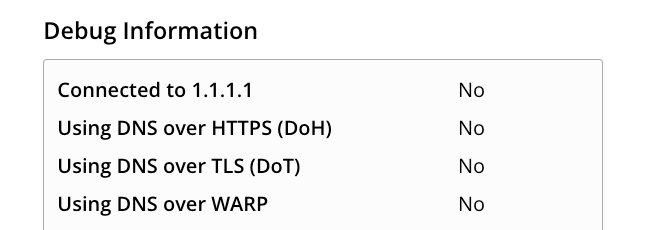
If you want to know whether your computer has it enabled, you can use this service: https://one.one.one.one/help/
My computer, for example, is set to not have it enabled by default:
Conclusion
When we want to visit huli.tw, the system will ask the DNS resolver for the IP corresponding to this domain. The resolver will first ask the root name server, which replies, “You should ask .tw,” then it will ask the TLD name server managing .tw, which replies, “You should ask Cloudflare.” As the authoritative name server, Cloudflare ultimately provides the answer 104.21.51.169.
If an attacker answers before Cloudflare does, saying, “I know, the answer is 8.8.8.8,” then when we visit huli.tw, we will connect to this fake address, which is a DNS cache poisoning attack.
To prevent this attack, it is necessary to ensure that attackers cannot forge packets. Therefore, mechanisms such as random transaction IDs, random ports, DNS cookies, and DNSSEC have emerged, all aiming to solve a similar problem: “How to ensure that the results obtained by the DNS resolver are correct.”
In addition, another problem that plaintext DNS inherently faces is privacy. When the system asks the DNS resolver what the IP of huli.tw is, everyone will know that I want to visit huli.tw.
To address this privacy issue, mechanisms like DoT and DoH have emerged, which protect the DNS query packets through encryption. Even if intercepted, the contents cannot be seen.
This is a summary of the key points of this article for your reference.
Initially, I was just curious about DNS cache poisoning and asked AI about attack methods, which led me to the paper “DNS Cache Poisoning Like it’s 2006.” From this paper, I learned about Dan Kaminsky’s attack method in 2008 and what DNS cookies are.
Then I kept pushing forward, learning about the DNS query process again (I had learned it before but not in such detail), and also checked what issues might arise, filling in my knowledge in this area. During this learning journey, AI helped a lot; I asked many questions directly to AI and got answers. I would cross-reference with ChatGPT, Gemini, and Codex (GPT 5.5) while also searching for related information on Google to verify the accuracy.
After going through this, I feel that I finally have a better understanding of the entire DNS system. The most rewarding part is for myself, and I also want to organize what I’ve learned and share it with readers. This article is a bit different because I’m starting to try to use AI to create some interactive web pages, hoping to aid understanding. I’m not sure how effective it will be, so any suggestions can be left in the comments below or shared with me through the form.
Comments